Private Booths for Online Interviews in Al Ain
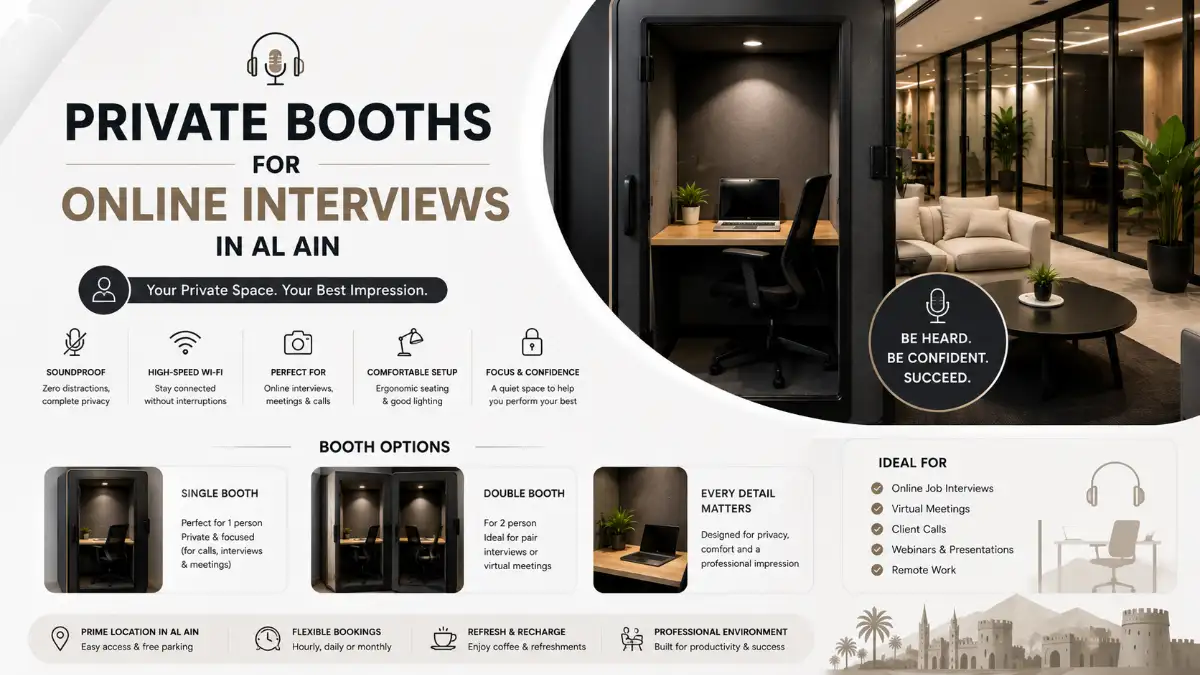
An online job interview may happen from your laptop, but the environment around you can still affect how professionally you communicate.
Background conversations, interruptions, poor lighting, people walking behind you, or difficulty hearing the interviewer can turn an important virtual interview into an unnecessarily stressful experience.
For job seekers, students, freelancers, remote professionals, and executives who cannot guarantee a suitable environment at home, finding a private booth for an online interview in Al Ain can provide a practical alternative.
A good interview space should offer privacy, low background noise, a professional setting, comfortable seating, and enough room to prepare before the call begins.
This guide explains which types of private spaces work best for virtual interviews, what you should check before booking, and how to prepare your workspace before joining an important interview.
Why Your Online Interview Environment Matters
Virtual interviews may be conducted remotely, but they should still be treated like professional meetings.
Your interviewer needs to hear you clearly, and you need to concentrate on the conversation rather than what is happening around you.
A suitable interview environment can help reduce common problems such as:
- Background conversations
- Family interruptions
- Café noise
- People walking behind you
- Poor seating
- Distracting backgrounds
- Lack of privacy
- Difficulty hearing questions
- Interruptions during important answers
Privacy is particularly valuable because an interview often includes discussions about your experience, current role, salary expectations, career plans, or other professional matters you may not want to discuss in a public environment.
1. Soundproof Single WorkBooths
For one person attending an online interview, a compact private booth is often one of the most practical options.
You generally do not need a large conference room just to join a video call.
A Single WorkBooth can provide the privacy required for one candidate, a laptop, headphones, and essential interview materials.
At SEEN Hub in Al Ain, the Soundproof Single WorkBooth is designed as a private one-person workspace and can be considered for online interviews and focused calls.
Why a Single Booth Works Well
It provides an environment where you can speak without conducting your interview in the middle of an open coworking area.
It can be useful for:
- Online job interviews
- Recruitment calls
- Zoom interviews
- Microsoft Teams interviews
- Google Meet interviews
- University admission interviews
- Remote assessments
- Client video calls
- Private professional conversations
For an individual candidate, this can be a more appropriate choice than reserving a larger room.
2. Double WorkBooths When You Need More Space
Sometimes you may prefer additional room.
Perhaps you have multiple devices, documents, a larger laptop setup, or simply prefer a slightly different working arrangement.
A Double WorkBooth can also be useful when two people need to join the same virtual meeting.
For example, two colleagues may be attending a remote client discussion together.
SEEN Hub also provides a Soundproof Double WorkBooth, giving users another private workspace option when a single-person setup does not match their requirements.
For an ordinary individual job interview, however, avoid booking more space than necessary.
Choose based on your actual needs.
3. Private Meeting Rooms for Formal Virtual Interviews
A meeting room may be worth considering for a particularly formal interview or a longer professional video conference.
It can also be appropriate when several people need to join the call from the same physical location.
A private meeting room may provide:
- More desk space
- Greater seating capacity
- Space for documents
- A formal business environment
- Room for multiple participants
For most individual online interviews, a private booth may be sufficient.
For panel participation, multi-person meetings, presentations, or longer virtual discussions, a meeting room can make more sense.
4. Why a Café Is Risky for an Important Online Interview
A café may look convenient when you need internet access and somewhere to sit.
The problem is unpredictability.
You cannot control:
- Nearby conversations
- Music
- Coffee machines
- Customer movement
- Children
- People walking behind you
- Sudden increases in noise
Even if the café is quiet when you arrive, there is no guarantee it will remain quiet throughout your interview.
Privacy is another concern.
You may need to discuss your employment history, professional responsibilities, availability, salary expectations, or other information during the conversation.
For an informal call, a café may be acceptable.
For an important job interview, a private environment is generally the safer choice.
5. Online Interviews From Home: When Should You Consider Another Space?
Home can be an excellent interview location when you have a private room and suitable setup.
You may not need to book another workspace if you already have:
- A quiet room
- Reliable internet
- A professional background
- Good lighting
- A comfortable desk
- Privacy from interruptions
However, another environment may be useful when you share accommodation, have children or family activity nearby, experience construction noise, lack an appropriate desk, or simply cannot guarantee privacy during the interview.
The objective is not to use a coworking space simply because you have an online interview.
It is to remove avoidable environmental risks.
What Should You Look for in an Online Interview Booth?
Not every private workspace is automatically suitable for an interview.
Check several factors before booking.
Privacy
The space should allow you to speak comfortably without worrying about nearby conversations.
Noise Control
A quiet or soundproof environment helps both you and the interviewer hear the conversation more clearly.
Internet Connectivity
Video interviews depend heavily on connectivity.
If possible, check your connection before the interview begins rather than discovering a problem when the recruiter joins.
Comfortable Desk Setup
Your laptop should be positioned at a suitable height.
Avoid balancing your computer on your lap during an important professional interview.
Lighting
Your face should be clearly visible.
Position yourself so that strong light is not directly behind you.
Professional Background
Keep the visible background simple and uncluttered.
The focus should remain on you rather than what is happening behind you.
Power Access
Make sure your laptop can remain powered throughout the interview.
Even with a fully charged battery, having charging access provides additional security.
How Early Should You Arrive for an Online Interview?
Do not arrive at the exact moment your interview is scheduled to begin.
Allow enough time to settle into the workspace and test your setup.
Arriving around 15–20 minutes early can give you time to:
- Connect your laptop
- Test your internet connection
- Check the camera
- Test your microphone
- Adjust your chair
- Check lighting
- Position your camera
- Open your CV
- Prepare notes
- Join the interview platform
You should ideally be technically ready several minutes before the interviewer expects you.
This removes unnecessary last-minute pressure.
How to Set Up Your Laptop for a Professional Video Interview
Position your laptop so that the camera is approximately at eye level.
If the laptop is too low, the camera angle can look unnatural.
Sit at a comfortable distance where your head and upper body are visible without being excessively close to the camera.
Before joining, check:
Camera: Is your face clearly visible?
Microphone: Can you be heard without background interference?
Internet: Is the connection stable?
Background: Is it clean and professional?
Lighting: Is your face properly illuminated?
Battery: Is the laptop charged or connected to power?
These checks take only a few minutes but can prevent avoidable problems.
Should You Use Headphones During an Online Interview?
Headphones can be helpful, particularly when they improve audio clarity and reduce echo.
However, use equipment you already know works reliably.
An important interview is not the best time to test unfamiliar Bluetooth headphones.
Before the interview, confirm that the correct microphone and speaker are selected inside the platform you will be using.
If your interview is on Microsoft Teams, Zoom, or Google Meet, use the platform's available device-check features before joining whenever possible.
Single WorkBooth vs Meeting Room: Which Is Better?
For most individual online interviews, a Single WorkBooth is likely to be the more practical option.
You mainly need:
- One seat
- A desk
- Privacy
- Low noise
- Laptop space
A meeting room becomes more relevant when you require additional space or several people are attending from the same location.
The principle is simple:
One-person online interview → private Single WorkBooth
Two-person call → Double WorkBooth or suitable private space
Multiple participants or presentation → meeting room
Choosing according to your actual requirements prevents you from reserving more space than necessary.
How Long Should You Book an Interview Booth?
Do not book only for the exact scheduled duration of the interview.
Recruitment calls can start slightly late or continue longer than expected.
You also need preparation time before the call.
Allow a reasonable buffer before and after your scheduled interview.
For example, if your interview is expected to take 45 minutes, your workspace booking should give you enough time to set up beforehand and avoid worrying about the booking ending while you are still answering questions.
The exact buffer depends on the interview and workspace booking conditions.
Common Mistakes to Avoid During a Virtual Interview
Booking Too Little Time
Give yourself enough time to prepare before the interview.
Joining From a Noisy Public Space
Background noise can make communication difficult and distract both parties.
Testing Equipment at the Last Minute
Check your microphone, camera, and internet before the call.
Sitting With Bright Light Behind You
This can make your face appear dark on camera.
Using a Distracting Background
Keep the visible environment professional and simple.
Leaving Notifications On
Turn off unnecessary desktop and phone notifications before the interview starts.
Depending on One Device Without Preparation
Keep your phone available as a backup communication option in case you need to contact the recruiter about a technical issue.
Where Can I Attend an Online Interview in Al Ain?
For an online interview in Al Ain, choose a private workspace with low background noise, reliable connectivity, comfortable seating, and enough privacy to speak freely. A soundproof Single WorkBooth can suit individual interviews, while larger private spaces or meeting rooms may be better for multi-person video calls and presentations.
The best option depends on the number of participants and the type of interview.
Who Can Benefit From a Private Interview Booth?
Private booths are not only useful for traditional job interviews.
They can also work well for:
- University admission interviews
- Internship interviews
- Scholarship interviews
- Recruitment screening calls
- Remote assessments
- Freelance client interviews
- Consultant meetings
- Virtual presentations
- HR discussions
- Professional video calls
Any conversation requiring privacy and concentration can benefit from an appropriate private environment.
Private Online Interview Spaces at SEEN Hub in Al Ain
For professionals and students looking for a private workspace in Al Ain, SEEN Hub provides both Single and Double WorkBooth options. Its website also lists meeting rooms and other professional workspace formats.
The Single WorkBooth can be considered when one person needs a private environment for an interview, virtual meeting, or focused call.
The Double WorkBooth provides an alternative when additional capacity is required.
For meetings involving more participants or requiring a larger professional setup, a meeting room may be more appropriate.
SEEN Hub is located in Al Khibeesi, Al Ain, providing a local option for people who would rather not conduct an important interview from home or a public café.
The goal is simple: choose the smallest professional environment that gives you the privacy and concentration required for the conversation.
Frequently Asked Questions
Where can I do an online job interview in Al Ain?
Consider a private coworking booth, soundproof workspace, meeting room, or another quiet professional environment. Prioritize privacy, noise control, connectivity, comfortable seating, and an appropriate video-call setup.
Can I use a coworking booth for a Zoom interview?
Yes. A private coworking booth can be particularly suitable for Zoom, Microsoft Teams, Google Meet, and other video interviews when it provides enough privacy and a quiet environment.
Is a soundproof booth good for job interviews?
A soundproof or noise-controlled booth can help reduce distractions and make it easier to speak naturally during an interview. You should still test your microphone, camera, connection, and lighting before joining.
Should I book a meeting room or a private booth?
For one-person virtual interviews, a private Single WorkBooth is generally sufficient. Consider a larger room when multiple people need to participate from the same location or you require additional presentation space.
How early should I arrive before an online interview?
Arriving approximately 15–20 minutes early gives you time to set up your laptop, test your microphone and camera, check the internet connection, and prepare before the interview begins.
Can students use private booths for university interviews?
Yes. Private booths can be useful for university admissions, scholarship interviews, internships, online assessments, presentations, and other academic video calls.
What should I bring to an online interview booth?
Bring your laptop and charger, headphones if needed, CV, relevant documents, interview notes, identification if required, and any information provided by the recruiter. Make sure you also have the correct interview link before arriving.
Ready to elevate your work experience?
Discover premium coworking spaces and private offices designed for productivity and growth.
Explore SeenHub Workspaces